
After hours / 24-7 auto-replies
After hours / 24-7 auto-replies
Ads run around the clock — decide whether the bot does too, or only covers the hours the client’s team is offline
Meta doesn’t pause the client’s ads at 6 p.m. — leads click at midnight, on Sundays, during lunch. Speed of the first reply is what decides whether that click becomes a conversation: answer within seconds and the lead is still on their phone; answer in the morning and they’ve messaged three competitors. The bot always replies instantly — the only real question is when it should be the one replying, and when the client’s human team takes over.
The two modes
- Reply 24/7. The bot answers every incoming message, any time. The team picks up qualified leads from the inbox whenever they’re online. This is the default recommendation for a lead-gen funnel: qualification happens the moment the lead writes, and nobody has to be awake for it.
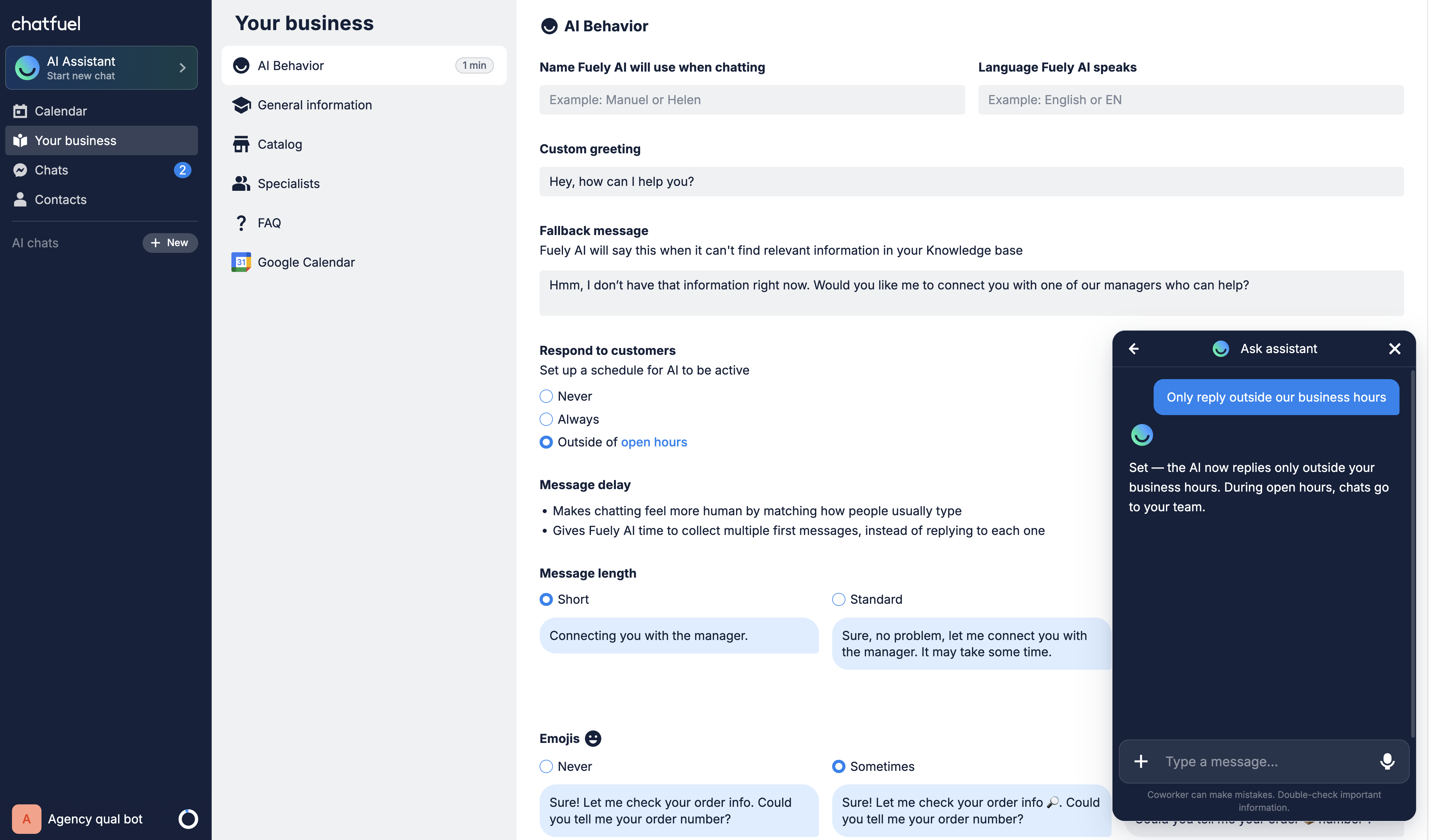
- Only outside business hours. During the client’s working hours the bot stays silent and the team answers live; nights, weekends, and holidays the AI takes over. Pick this when the client insists their staff handle daytime chats personally — the bot becomes their night shift.
There is no “bot never replies” mode worth configuring in a funnel — an unanswered ad click is money already spent.
Which one to recommend
For most performance-marketing clients: 24/7. The bot’s whole value is instant, consistent qualification — and a lead who wrote at 2 p.m. doesn’t mind an AI any more than one who wrote at 2 a.m. Reserve “outside business hours” for clients whose daytime sales conversations are genuinely consultative and staffed — say, a clinic whose administrators already answer within a minute. Either way, qualified leads land in the same team inbox, and the handoff rules work the same in both modes.
The trap: 'outside business hours' with no business hours set
The outside-hours mode needs to know what the hours are. If the client’s business hours aren’t set in Chatfuel, there’s no “inside” to stay silent in — the bot effectively answers around the clock anyway. So when you pick this mode, set the weekly schedule first: hours per day, days not listed count as closed. The timezone is taken from the bot’s own settings — no need to specify it. Business hours live in the Knowledge Base as part of the client’s business info, so a well-run onboarding has them filled already.
How to set it
The “Set up WhatsApp” onboarding asks this exact question — “should the bot reply around the clock, or only outside your business hours?” — right before connecting the channel, so a bot built through onboarding already has the answer configured. To change it later, tell the Co-Worker:
- “Make the bot reply 24/7.”
- “Only reply outside our business hours.”
- “Update our business hours: Mon–Fri 9 to 18, Sat 10 to 14.”
Prefer the settings screen? The mode lives under the AI profile’s Respond to customers setting, with business hours on the General tab.
Where to next
What the bot actually does during those night shifts.
Why the instant first reply matters on Meta channels.
Reply settings are one of the bot’s five modules — see the rest.
Bot silent when it shouldn’t be? The reply mode is suspect #3.