
Any report by asking the AI Co-Worker
Any report by asking the AI Co-Worker
No dashboards to learn, no exports to wrangle — a data analyst on staff for every client, answering in the same chat where you run everything else
An agency running ten clients doesn’t have time to learn a BI tool, build ten dashboards, and keep them updated. Chatfuel takes a different route: the analyst is already on staff. Ask the AI Co-Worker a question in plain language — inside any client’s company — and it answers from that client’s real data: the conversations, the pipeline, the bookings, the outcomes. Every report you’ll read about in this section is pulled exactly this way.
Ask anything
The Co-Worker covers the whole span from “one number, quick” to “read a hundred conversations and tell me what’s wrong”:

No query language, no filters to configure — the phrasing above is literally how you ask.
It reads the actual conversations
This is the part dashboards can’t do. The Co-Worker doesn’t just count rows — it reads the transcripts. Ask “why do deals fail” and it studies lost conversations against won ones, names the typical drop-off point, and lists the objection patterns — quoting the leads’ real messages, not paraphrasing. Ask “what do clients ask most” and it mines the whole history for recurring questions, complaints, and missed opportunities. Sentiment, open issues, what was agreed with a specific lead — it’s all in there, because it’s all in the conversations.
And it plays by an analyst’s rules: it never invents a number. Every figure comes from the client’s actual data, and if the data isn’t there, it says so instead of estimating.
Every report ends in a to-do
A funnel chart that just sits there is trivia. The Co-Worker’s reports end with what to do: a business report closes with its top recommendations, a risk scan ends with the list of contacts to rescue first, an AI diagnostic names the exact knowledge worth adding to the Knowledge Base. It surfaces and advises — the actions themselves (messaging leads, changing bot settings) stay yours to trigger, which is exactly how you want an analyst to behave around a client’s live funnel.
The agency workflow
Because every client is a separate company in your workspace, the same questions work identically across your whole roster. A Monday routine that used to be a morning of spreadsheet archaeology becomes ten minutes of chat: open each client’s company, ask “business report” and “clients at risk”, collect the numbers and the to-dos, move on. Same questions, every client, zero setup per client.
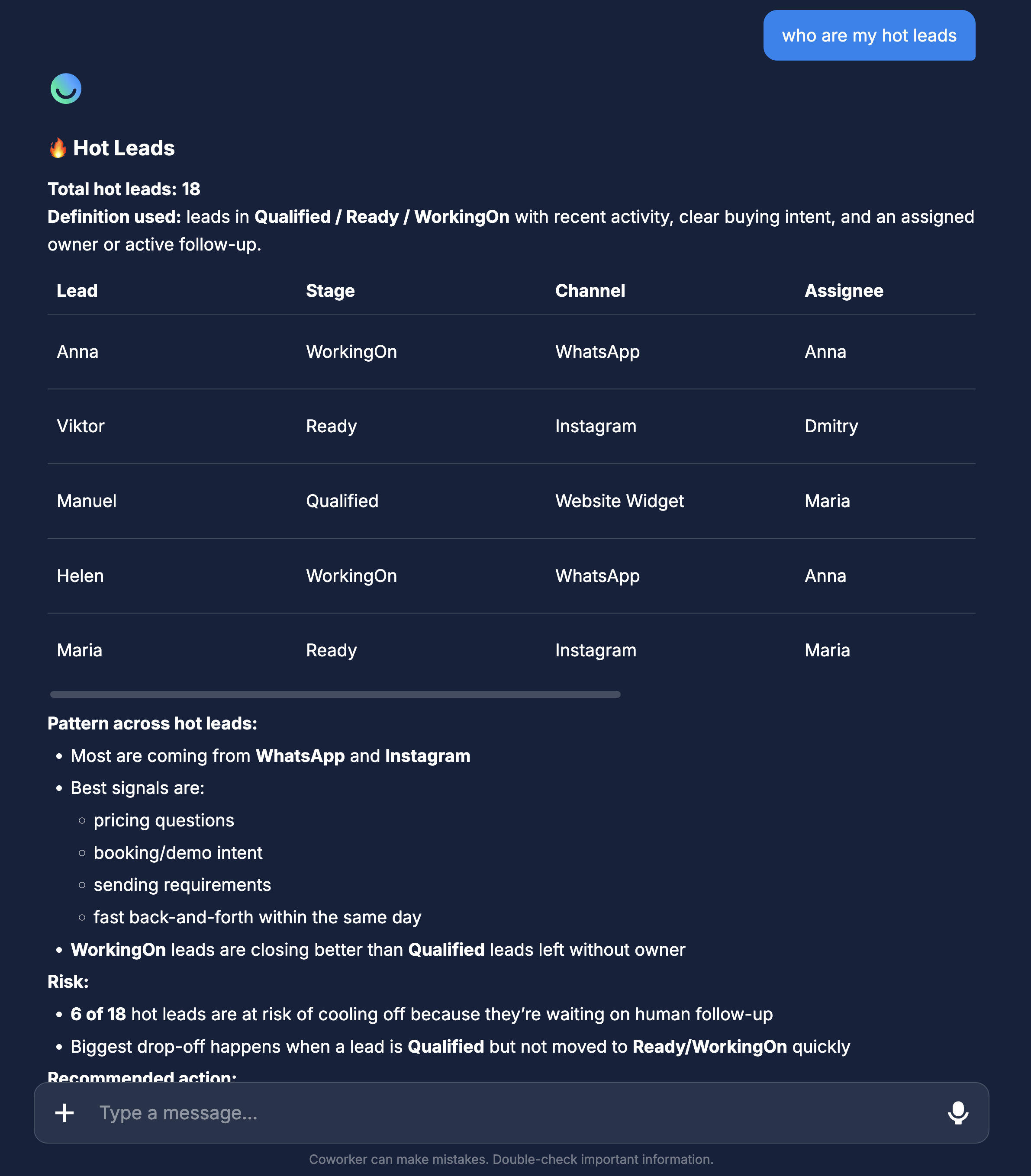
Answers are only as good as the data behind them
The Co-Worker reports on what actually happened in the client’s funnel — so the quality bar is set upstream. A well-filled Knowledge Base and qualification fields that match the niche make every answer sharper, from the funnel counts to the lost-deal analysis.
Where to next
The full chain from ad spend to sales — and where each number lives.
FAQ mining, objection patterns, and lost-deal autopsies in depth.
The first report to pull for any client, decoded stage by stage.
Turn ten minutes of asking into the monthly report clients renew for.