
What to ask the client for
The access checklist that decides your launch date — collect it before the kickoff call, not after
Nothing delays a client launch like access collection. Not creatives, not strategy, not budget approvals — access. The client grants half of what you need, forgets the pixel, shares the wrong ad account, and your “we go live Monday” quietly becomes “we go live in two weeks.” This guide exists so that never happens to you: here’s exactly what to collect, who grants it, and where to find the scripts that get it without a single awkward call.
Why this step decides everything
The funnel you’re about to build — ads → bot → qualification → lead — runs on the client’s assets: their Facebook Page, their Instagram, their WhatsApp number, their ad account. All of it lives inside the client’s Meta Business Portfolio (you’ll also hear the older name, Business Manager). Until you’re inside, you can’t launch ads, connect channels, or install tracking.
And here’s the part that surprises new agencies: every access grant happens on Meta’s side, in the client’s account. Chatfuel reads those connections but cannot create them — there is no button inside Chatfuel that gives you access to a client’s business. The client (or someone with full control of their portfolio) has to grant it at business.facebook.com.
The checklist
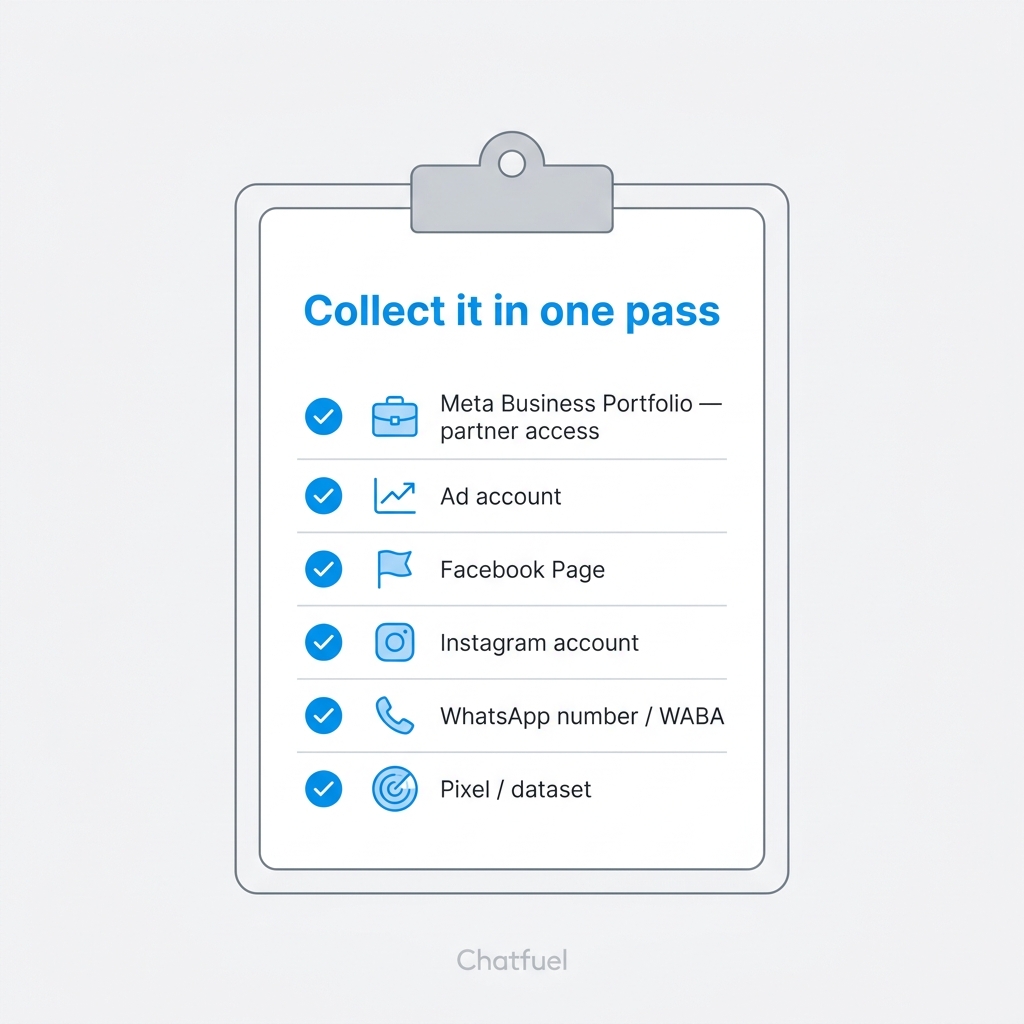
Collect all of it in one pass. Going back to the client three times for “one more thing” is how launches slip.
One thing that is NOT on the list
Never ask for the client’s Facebook password. It’s against Meta’s terms, it gets accounts checkpointed, and it makes you look like an amateur. Partner access exists precisely so nobody shares logins.
Two levels of access — know which one you’re asking for
For most agency work, partner access is enough: the client connects your agency’s Business Portfolio to theirs, assigns specific assets, and you distribute permissions to your own team. Clean, revocable, professional.
But connecting channels to Chatfuel has a higher bar. Whoever clicks Connect for the client’s WhatsApp must be logged in with a Facebook account that has Full control of the client’s business portfolio (check at business.facebook.com/settings/people). Instagram is stricter still — the authorization must happen from the client’s own Instagram account. In practice, agencies handle this one of two ways:
- Do it together. A 15-minute screen-share where the client logs in and you tell them exactly where to click. Zero access paperwork, works every time.
- Get added with Full control. The client adds one person from your team in Business Settings → People with Full control. More setup, but you can connect and reconnect without scheduling calls.
Which client do you have?
Every client walks in as one of two cases. Pick your route:
The standard case. Get partner access in 10 minutes — two ways to do it, including one where the client only clicks Approve.
No portfolio, no Page, maybe just a personal Instagram. Build their Meta foundation from scratch — in their name, not yours.
Copy-paste messages that explain what you need in client language — plus answers to “is this safe?”
The request vanished, the assets aren’t visible, the real admin left the company — every dead-end and its exit.
After access: the order of operations
Once the checklist is green, the launch sequence is mechanical:
- Create the client’s company in Chatfuel — one client, one company; billing stays on your agency’s side.
- Connect WhatsApp and Instagram using the access you just collected.
- Get business verification moving early — it lifts the 250-chats-a-day cap, and you don’t want to discover that cap on launch day.
Collect once, launch once. That’s the whole trick.